Cloud Technologies
VMware Alternatives: Is Proxmox the Right Choice for Enterprises?
After Broadcom acquired VMware in 2023, the picture changed fast. Perpetual licenses were discontinued and everything moved to a subscription model.
- Author
- İrem
- Category
- Cloud Technologies
- Published on
- Updated on
5 min read
What Has Changed at VMware?
After Broadcom acquired VMware in 2023, the picture changed fast. Perpetual licenses were discontinued and everything moved to a subscription model. Products that could previously be bought separately were bundled into large packages, so you now have to pay for features you do not need as well. Affordable options designed for small and medium-sized businesses were withdrawn.
The result: some companies now pay 2-5 times more per year to run the same infrastructure. This has forced IT managers to sit down and ask, "What else can we use?"
What Is Proxmox?
Proxmox VE is an open-source virtualization platform developed by the Austrian company Proxmox Server Solutions. It combines KVM (Kernel-based Virtual Machine) and LXC (Linux Containers) technologies. With a web-based management interface, high availability (HA) clustering, live migration and built-in backup, it aims to be an enterprise-grade platform.
For basic use, it can be downloaded and used free of charge. Paid subscription plans are available for enterprise support, current security patches and access to the stable repository, but these costs are quite low compared with VMware licenses.
Advantages of Proxmox over VMware
A clear cost advantage
The most direct advantage is cost. You can use Proxmox completely free of charge without a support subscription. Even with an enterprise support subscription, you pay far less than you would pay VMware for the same infrastructure. For companies with many servers in particular, the difference can reach hundreds of thousands of Turkish lira.
Open-source flexibility
In VMware, every feature is tied to a license bundle, while in Proxmox all platform features are available. Advanced clustering, live migration, backup and HA can all be used without additional licenses. Its open-source nature also gives you much more freedom for customization and integration.
A strong community and ecosystem
Proxmox is backed by an active developer community. The documentation is comprehensive and the forum discussions are rich. For most problems, finding a solution is as fast as with VMware, and in some cases even faster.
Disadvantages of Proxmox and Points to Consider
The enterprise support ecosystem is not as mature as VMware's
VMware's biggest advantage is documented enterprise-grade support and a broad partner ecosystem. Proxmox lags behind in this area. In large enterprise environments in particular, the answer to "Can I get support with a guaranteed SLA?" when a problem occurs is not as clear as with VMware.
Take care in Windows-heavy environments
Proxmox is a Linux-based platform. You can run Windows virtual machines on KVM, but performance optimization and driver management require more technical knowledge than with VMware. In Windows-heavy infrastructures, this difference can become noticeable.
Migration requires technical planning
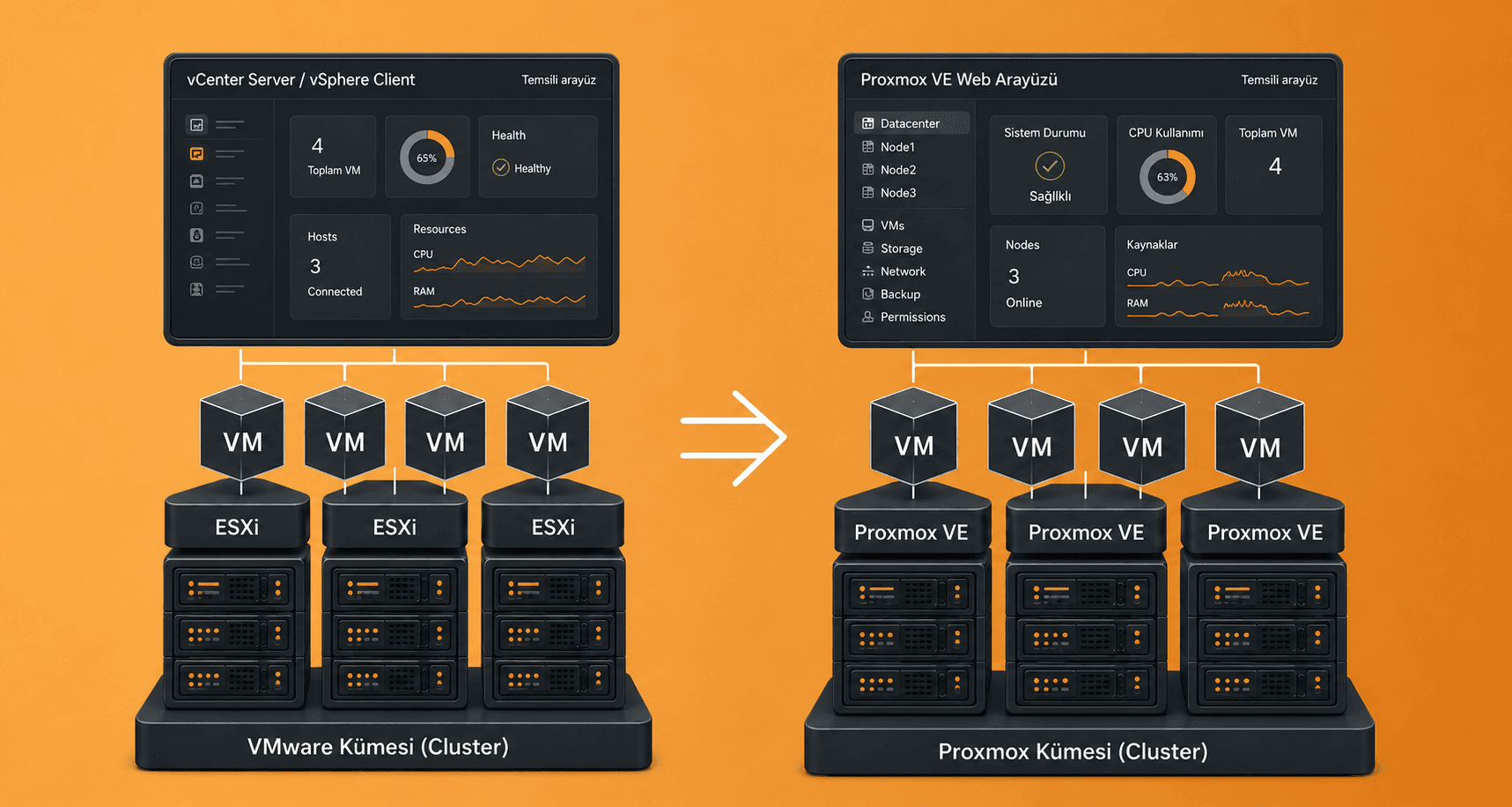
Migrating from VMware to Proxmox is not a plug-and-play process in which virtual machines can be moved directly. VM formats must be converted, the network design must be rebuilt and the storage architecture must be reviewed. A poorly planned migration can cause downtime in the production environment.
Which Companies Is Proxmox Right For?
Every organization has different needs. Proxmox is a strong option for companies with the following profiles:
For mid-sized companies with Linux-based infrastructure whose budgets are strained by VMware license costs, Proxmox delivers significant savings. Organizations with a technical IT team that can manage their own virtualization infrastructure and are familiar with the open-source ecosystem get the most out of the platform. For companies building a new data center or a virtualization infrastructure from scratch, Proxmox also offers a strong foundation with a much lower initial cost than VMware.
For the opposite profile, however, meaning large-scale, Windows-heavy environments that require guaranteed enterprise support and outsource virtualization management, the migration should be evaluated more carefully. In this case, Nutanix or Microsoft Hyper-V should also be considered as alternatives to VMware.
4 Points to Consider During Migration
1. Build an inventory of your current VMs
How many virtual machines are there, which operating systems do they run and how much storage do they need? You cannot plan a migration without this inventory.
2. Start with a pilot environment
Instead of moving critical systems directly, first install Proxmox in a test environment, move a few low-priority systems and observe how they behave. Migrate production only after this process has been completed successfully.
3. Redesign your network and storage architecture
Proxmox does not provide a one-to-one equivalent of VMware's network virtualization solutions such as NSX. You need to clarify how your current network design will be built with Proxmox before the migration. Distributed storage solutions such as Ceph integrate well with Proxmox, but installation and management require technical knowledge.
4. Set up your backup strategy
PBS (Proxmox Backup Server), Proxmox's own backup tool, is a powerful solution. Designing the backup infrastructure as part of the migration gives you a way to roll back if a problem occurs.
Manage Your Migration from VMware to Proxmox with Synchron Bilişim
Migrating from VMware to Proxmox is not only a technical decision but also a strategic one. If the right steps are not taken in analyzing your current infrastructure, planning the migration, running the pilot and migrating production, business continuity can be put at risk.
At Synchron Bilişim, we manage the entire process, from virtualization infrastructure assessment and migration planning to installation, configuration and setting up post-migration monitoring. Explore our managed services.
About the author
İrem